

Reports of ransomware affecting Synology NAS devices have raised immediate questions for home users and administrators: which systems need attention, and what remains recoverable after encryption?
As of October 30, 2026, multiple incidents have been reported. The public record does not provide a complete victim count or a verified entry route for every device. The observed extension is .L0CK3D, with a zero. A filename is an investigative clue, not a complete malware identification.
Two reports describe different entry routes
On October 29, 360 said it had received several Synology ransomware requests since October. It identified analyzed samples as C3RB3R, a Cerber variant, appending .L0CK3D and dropping read-me3.txt. Its investigation attributed entry to CVE-2026-13639 and CVE-2026-13684. 360 research
Synology published fixes for that vulnerability group on September 18 in SA-26:13.
Synology's own October 29 statement describes exploitation of an older vulnerability patched in December 2024 and directs readers to SA-24:20. Vendor statement
Those are different attributions. Public evidence supports patching known vulnerabilities; it does not establish one entry route for every incident or confirm a new zero-day affecting the latest DSM. Device logs and samples remain necessary.
Review exposure and exact patch levels
Inspect router forwarding, automatic UPnP mappings, reverse proxies and externally reachable services. DDNS supplies a name; it does not secure the destination. Remove unnecessary public access, especially DSM administration, SMB and SSH. Use a maintained VPN with controlled access where remote administration is needed. A different public port still exposes the service.
The DSM version is normally under Control Panel → Update & Restore; labels vary by release. Record the full build and update number. SA-26:13 lists these fixed releases:
- DSM 7.4: 7.4-90075.
- DSM 7.3: 7.3.2-86009-4.
- DSM 7.2.2: 7.2.2-72806-9.
- DSM 7.2.1: 7.2.1-69057-12.
These are minimum fixes for that advisory, not downgrade targets. Install a newer supported security release, review SA-24:20 and subsequent advisories, and check model support, upgrade paths and package compatibility. If a system cannot be patched, remove direct public access while arranging isolation or replacement. Release requirements
Review Package Center updates, unused accounts, sharing links and services. Give ordinary users only the folder permissions they need, separate administration credentials, and enable strong passwords and MFA. Authentication controls complement patching. Protection guidance
Check what your protection actually preserves
RAID addresses drive failures and availability. It also faithfully stores encrypted writes. Synchronization may copy changed files to another location, including damaged versions. Check history retention and recovery permissions rather than assuming a second online copy is safe.
Snapshots preserve points in time. Immutable snapshots add protection against changes or deletion during a retention period, where the model, filesystem and software support them. Check the actual configuration and supported models. Immutable snapshot documentation
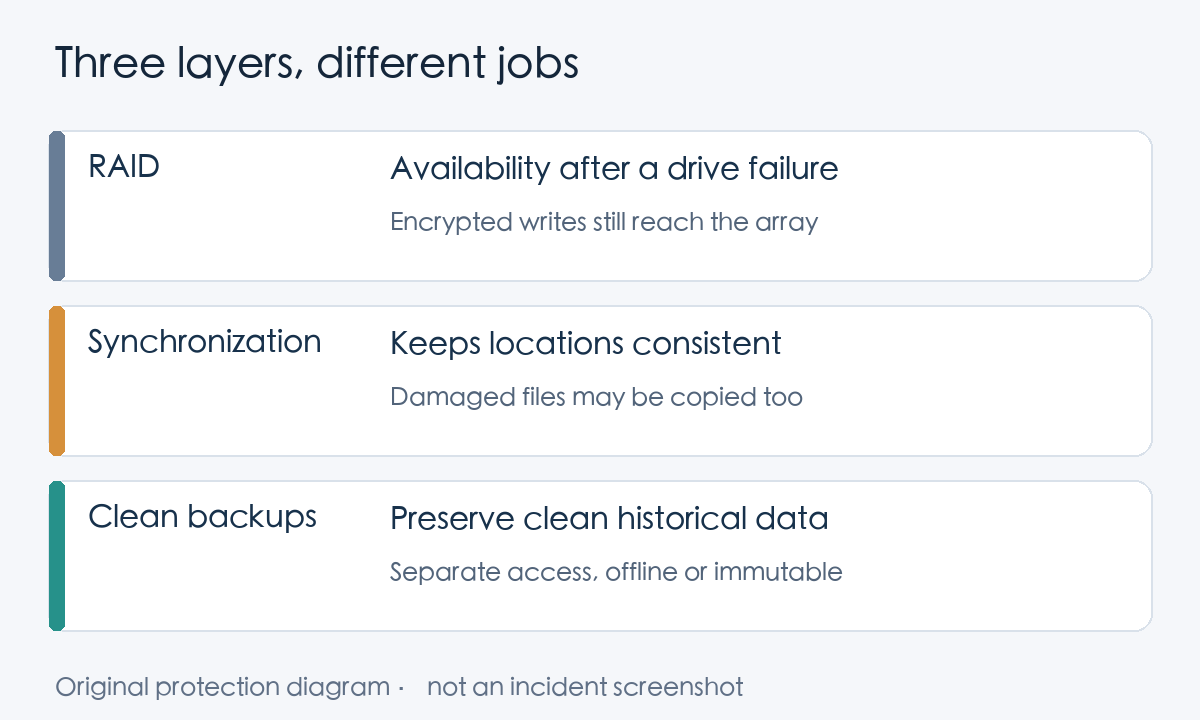
Keep important data in a copy that a compromised production account cannot normally change: disconnected backup media, or a separately administered offsite backup with retention protection. Synology recommends 3-2-1 backup: three copies, two media types and one offsite copy. Combine it with offline isolation or immutability as appropriate. Vendor backup guidance
Restore a recent file and an older one into a separate location, then open both. A successful scheduled job is useful evidence; a usable restored file tests the result you actually need.
If encryption is suspected, contain the incident
Isolate the NAS and suspect clients from networks, and protect backup destinations. Isolation can stop remote access and spread; a process already running on the NAS may continue encrypting local data. Responders must assess active writes promptly.
Pause synchronization, replication and rotation tasks that might replace clean history. Keep offline backups disconnected. Coordinate storage, network and backup owners so that one system does not continue copying damaged data while another is isolated.
Record discovery time, the full DSM version and known exposure. Preserve logs, the ransom note and selected affected-file samples. Resetting or reinstalling before evidence collection can obstruct investigation. Contact Synology support or an incident-response professional; assess any proposed decryptor against the exact variant and test on copies. Recovery guidance
Power decisions depend on conditions. Keeping an isolated device running can preserve volatile evidence. If network isolation is impossible, shutting down may help contain spread. Ongoing local encryption requires responders to balance stopping writes against evidence preservation; unplugging Ethernet alone does not stop an existing local process. CISA response checklist
Address the entry point, accounts and compromised environment before restoring clean backups into a trusted system. Paying a ransom does not guarantee complete recovery or a safe device.
Include the business systems that depend on the NAS
For organizations storing call recordings, quality-assurance files, exported call records or application backups, check whether new recordings still arrive, historical audio plays, and backup rotation is preserving clean history. This is an operational example, not a claim that a particular call center was affected by this campaign.
Review who can write recordings, who can delete backups, and whether restored files work in the application. Start with unnecessary public exposure, DSM and package patches, and an actual file restore. If there are signs of compromise, incident containment comes before routine maintenance: installing a patch alone does not remove an intrusion that has already happened.